LangChain Code node#
ใช้ LangChain Code node เพื่อ import LangChain ซึ่งหมายความว่าหากมีฟังก์ชันที่คุณต้องการแต่ n8n ยังไม่ได้สร้าง node ให้ คุณก็ยังสามารถใช้งานได้ โดยการกำหนดค่า LangChain Code node connectors คุณสามารถใช้มันเป็น node ปกติ, root node หรือ sub-node ได้
ในหน้านี้ คุณจะพบ node parameters, คำแนะนำในการกำหนดค่า node และลิงก์ไปยังแหล่งข้อมูลเพิ่มเติม
Not available on Cloud
Node นี้มีให้ใช้งานเฉพาะบน n8n แบบ self-hosted เท่านั้น
Node parameters#
Add Code#
เพิ่ม custom code ของคุณ เลือกโหมด Execute หรือ Supply Data คุณสามารถใช้ได้เพียงโหมดเดียว
ต่างจาก Code node LangChain Code node ไม่รองรับ Python
- Execute: ใช้ LangChain Code node เหมือนกับ Code node ของ n8n เอง ซึ่งจะรับ input data จาก workflow, ประมวลผล และส่งคืนเป็น node output โหมดนี้ต้องการ main input และ output คุณต้องสร้างการเชื่อมต่อเหล่านี้ใน Inputs และ Outputs
- Supply Data: ใช้ LangChain Code node เป็น sub-node โดยส่งข้อมูลไปยัง root node ซึ่งจะใช้ output อื่นที่ไม่ใช่ main
โดยค่าเริ่มต้น คุณไม่สามารถโหลด built-in หรือ external modules ใน node นี้ได้ ผู้ใช้ self-hosted สามารถ เปิดใช้งาน built-in และ external modules ได้
Inputs#
เลือกประเภท input
Main input คือ connector ปกติที่พบใน n8n workflows ทั้งหมด หากคุณมี main input และ output ที่ตั้งค่าไว้ใน node จำเป็นต้องใช้ code แบบ Execute
Outputs#
เลือกประเภท output
Main output คือ connector ปกติที่พบใน n8n workflows ทั้งหมด หากคุณมี main input และ output ที่ตั้งค่าไว้ใน node จำเป็นต้องใช้ code แบบ Execute
Node inputs and outputs configuration#
โดยการกำหนดค่า LangChain Code node connectors (inputs และ outputs) คุณสามารถใช้มันเป็น app node, root node หรือ sub-node ได้
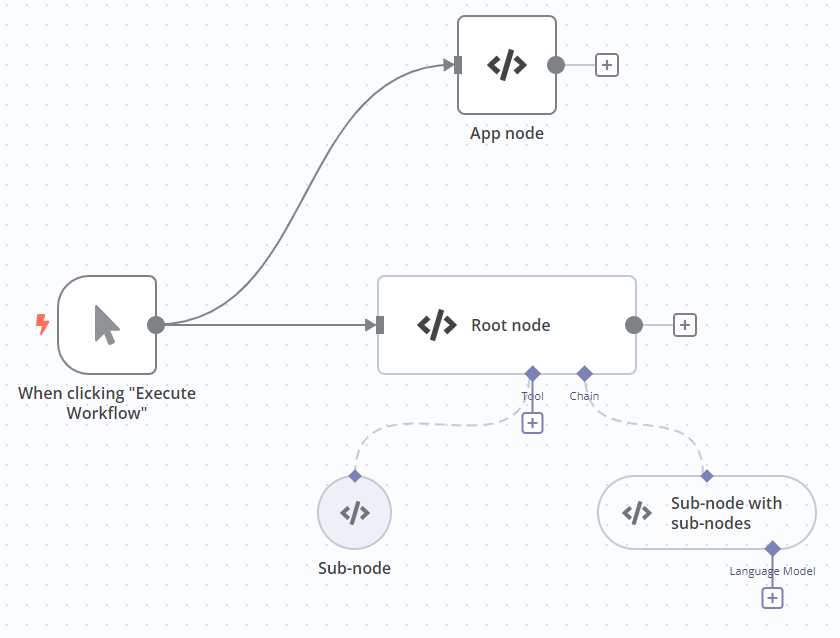
| Node type | Inputs | Outputs | Code mode |
|---|---|---|---|
| App node คล้ายกับ Code node | Main | Main | Execute |
| Root node | Main; อย่างน้อยหนึ่งประเภทอื่น | Main | Execute |
| Sub-node | - | ประเภทอื่นที่ไม่ใช่ main ต้องตรงกับประเภท input ที่คุณต้องการเชื่อมต่อ | Supply Data |
| Sub-node พร้อม sub-nodes | ประเภทอื่นที่ไม่ใช่ main | ประเภทอื่นที่ไม่ใช่ main ต้องตรงกับประเภท input ที่คุณต้องการเชื่อมต่อ | Supply Data |
Built-in methods#
n8n มี methods เหล่านี้เพื่อให้ง่ายต่อการทำงานทั่วไปใน LangChain Code node
| Method | Description |
|---|---|
this.addInputData(inputName, data) |
Populate the data of a specified non-main input. Useful for mocking data.
|
this.addOutputData(outputName, data) |
Populate the data of a specified non-main output. Useful for mocking data.
|
this.getInputConnectionData(inputName, itemIndex, inputIndex?) |
Get data from a specified non-main input.
|
this.getInputData(inputIndex?, inputName?) |
Get data from the main input. |
this.getNode() |
Get the current node. |
this.getNodeOutputs() |
Get the outputs of the current node. |
this.getExecutionCancelSignal() |
Use this to stop the execution of a function when the workflow stops. In most cases n8n handles this, but you may need to use it if building your own chains or agents. It replaces the Cancelling a running LLMChain code that you'd use if building a LangChain application normally. |
Templates and examples#
Related resources#
ดูเอกสาร Advanced AI ของ n8n
AI glossary#
- completion: Completions are the responses generated by a model like GPT.
- hallucinations: Hallucination in AI is when an LLM (large language model) mistakenly perceives patterns or objects that don't exist.
- vector database: A vector database stores mathematical representations of information. Use with embeddings and retrievers to create a database that your AI can access when answering questions.
- vector store: A vector store, or vector database, stores mathematical representations of information. Use with embeddings and retrievers to create a database that your AI can access when answering questions.